
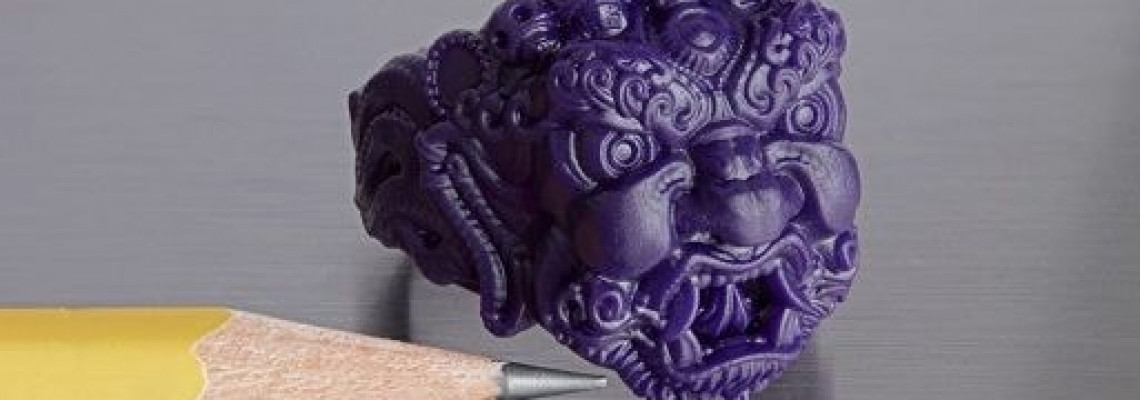
Choosing a 3D Printer Based on Its Resolution
Resolution in 3D printing — what does this term mean? How does a 3D printer's resolution affect the printing of models, and how does it differ across SLA, FDM, and DLP technologies? How does XY and Z-axis resolution impact the quality of models produced on a 3D printer? What minimum feature size and layer thickness should you choose?
3D Printing Resolution and Minimum Feature Size
The concept of "resolution" has been a part of the technology manufacturing race for decades. For devices with displays, such as TVs, mobile phones, or tablets, this is one of the main specifications. When it comes to this parameter in traditional 2D printing, a resolution of 1200 by 1200 dots per inch (DPI) in the X and Y dimensions is quite clear to the user and requires no explanation. However, if we add the Z dimension to printing, there are nuances that we will explore in this article.
3D Printing Resolution
In 3D printing and additive manufacturing, three dimensions must be considered: two planar 2D dimensions (X and Y) and a third Z dimension, through which three-dimensional printing is carried out. Since print accuracy along the XY plane and the third Z-axis is typically controlled by different mechanisms, their resolutions may vary. Therefore, they must be considered separately. As a result, the interpretation of the term "3D printing resolution" can lead to discrepancies and unfounded expectations regarding print quality.
Resolution in 3D Printing: Comparing Different 3D Printing Technologies
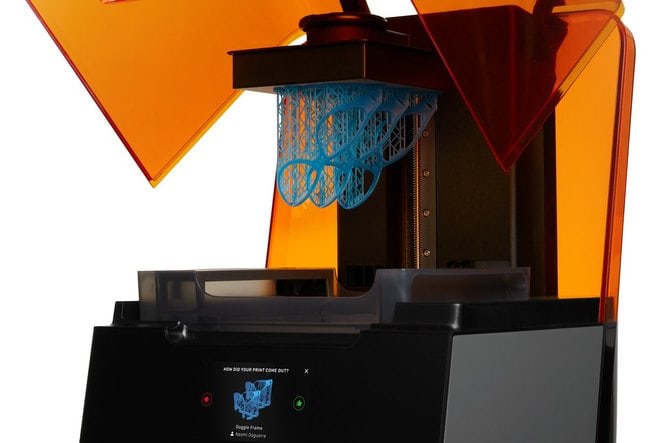
High-resolution Formlabs stereolithography 3D printers feature high Z-axis resolution and a low minimum feature size on the XY plane, allowing them to capture fine details.
It is difficult to isolate a single factor affecting a 3D printer's resolution. Because 3D printers build parts in three dimensions, at least two factors must be taken into account: the minimum feature size in the XY plane and the Z-axis resolution (layer thickness or height). Because Z-axis resolution is easy to determine, manufacturers cite it more often, even though it is less correlated with print and surface quality. The more important XY resolution (minimum feature size) is harder to measure, so it does not always appear in technical specifications.
In practice, this means that a 3D printer must excel in both categories, i.e., in all three dimensions.
3D Printing Based on SLA and FDM Technologies
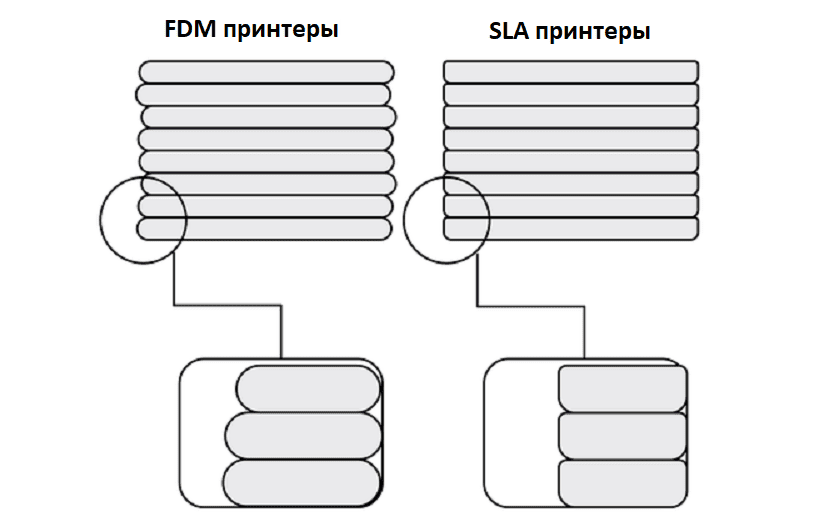
Technologies do not stand still, and currently, 3D printers based on SLA technology, which use laser resin polymerization, demonstrate an advantage in print quality over FDM printers, which use a "layering" of molten plastic. SLA printers print models with a smoother surface and a higher degree of detail, but not because they can provide a much smaller layer thickness. The reason for the improved 3D print quality is the significantly higher resolution along the XY axes.
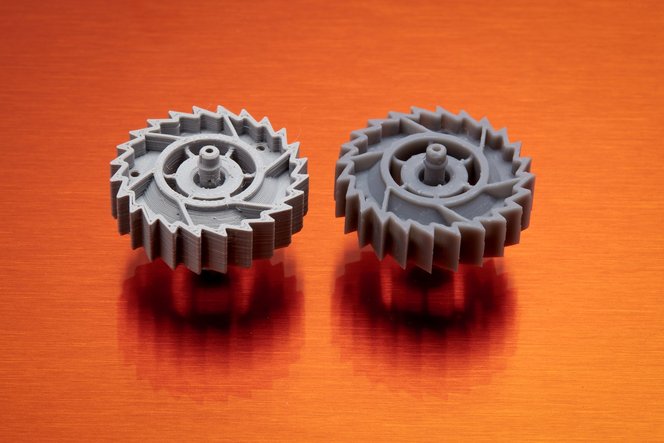
SLA printers (right) have a higher resolution and allow for models with a smoother surface and a higher degree of detail than FDM printers (left).
Unlike FDM-based 3D printers, the minimum feature size in the XY plane in stereolithography 3D printers is not limited by the flow dynamics of molten plastic, but is largely determined by the optics and kinetics of radical polymerization. Simply put, the XY detailing of a model in SLA printers depends on the laser spot diameter and roughly corresponds to its size. And laser spots can be very small, especially compared to the nozzles on FDM printers.
3D Printing Based on SLA and DLP Technologies
Polymer-based 3D printing technologies such as SLA, LFS, and DLP provide the maximum resolution of all 3D printing processes available for desktop printers. The basic units of measurement for SLA and DLP processes are different shapes, making it difficult to compare printers by numerical specifications alone.
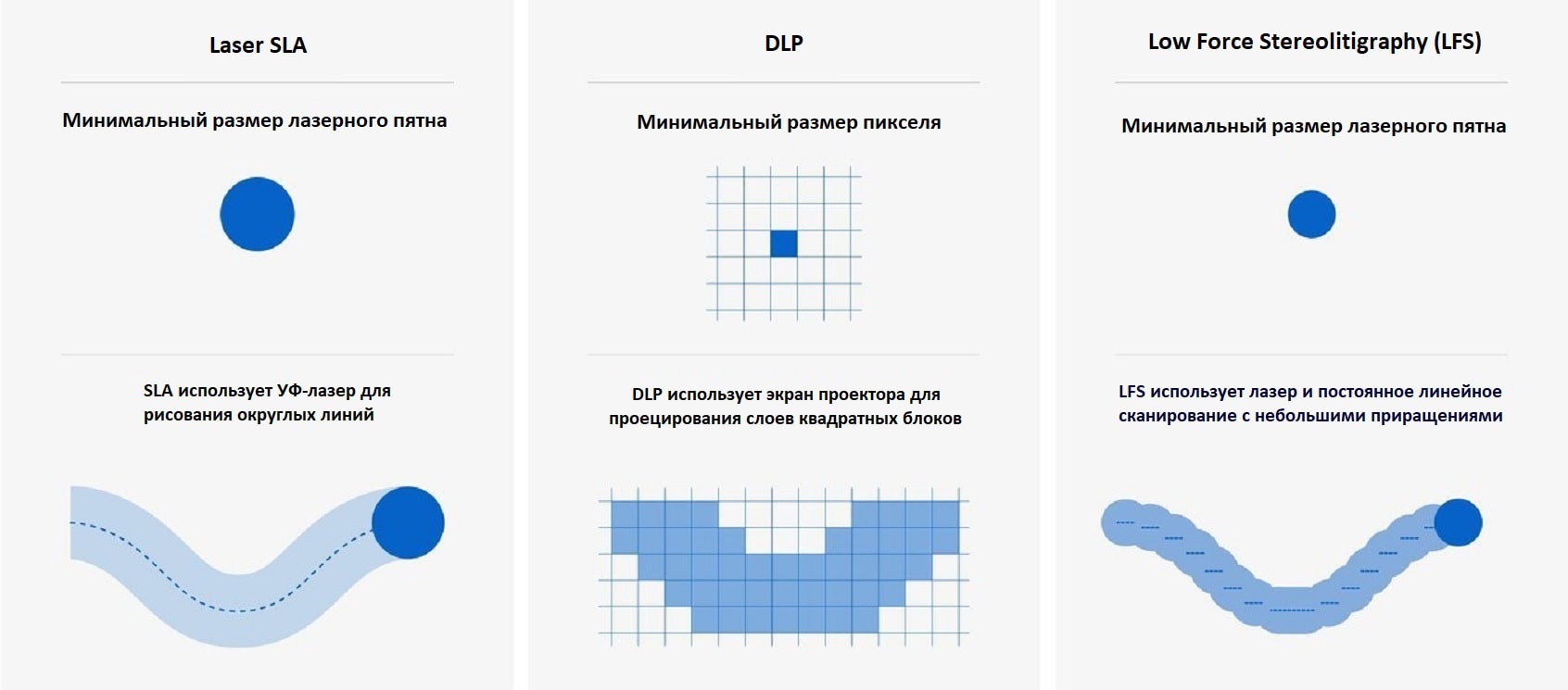
DLP-based 3D printers have a fixed pixel matrix relative to the build area, while SLA and LFS printers, which use a laser, focus the laser beam at any coordinate on the XY plane. Consequently, laser 3D printers with high-quality optics can more accurately reproduce the surface of a model, even if the laser spot size is larger than the pixel size in a DLP printer.
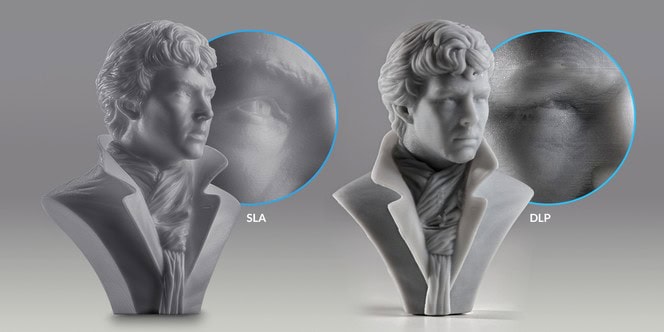
SLA and LFS (left): layer lines are virtually invisible, surface roughness is reduced, providing a smoother finish, and on transparent materials — models with greater clarity. In DLP (right), rectangular voxels are used to build 3D shapes, which can lead to the appearance of vertical lines.
Resolution in 3D Printing. XY Resolution
In the world of 3D printing, the factor that most affects model quality is XY resolution. The concept of horizontal XY resolution varies across different 3D printing technologies:
- SLA 3D printers — a combination of the laser spot size and the increments by which the beam can be controlled;
- DLP printers — pixel size, the smallest detail the projector can reproduce in a single layer;
- FDM printers — the smallest distance the extruder can move within a single layer.
Generally, the lower this value, the higher the detail. But this number is not always stated in technical specifications, and even if it is, it's not always accurate. To get an idea of the true XY resolution, it is important to understand how the printer works.
To find out how horizontal XY resolution affects model quality, let's run a test on the Form 2 SLA printer. Its laser spot size is 140 microns, which should allow it to reproduce fine details on the XY plane. Let's check if this ideal resolution corresponds to reality.
Designing a Model to Test 3D Printer Resolution
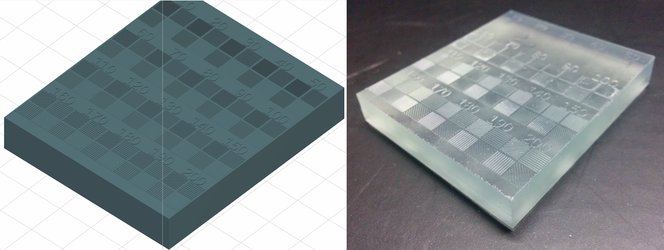
To test the minimum feature size on the XY plane for the Form 2, we'll take a model (left) with lines ranging from 10 to 200 microns thick and print it with Clear Resin (right).
The model is a rectangular block with lines of varying widths in horizontal, vertical, and diagonal directions, applied to prevent shifting. The thickness of the lines ranges from 10 to 200 μm, the lines are spaced 10 μm apart and have a height of 200 μm, which corresponds to two layers when printing at a 100 μm resolution for the Z-axis. This model was washed twice in isopropyl alcohol and post-cured for 30 minutes.
Model Analysis
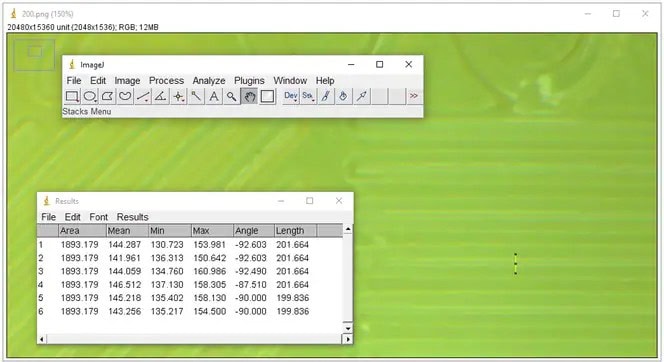
The model was photographed and dyed green to improve visibility. The vertical yellow line with black dots on the right side of the window is for measuring the width of the photographed line.
After post-curing, we placed the model under a microscope and took a high-resolution photograph for further analysis. Using ImageJ, a free image analysis software from the US National Institutes of Health (NIH), we scaled the image pixels and measured the actual width of the printed lines. We collected more than 50 data points per line width to eliminate measurement errors and variability. We analyzed three models produced on two printers.
Analyzing the Results
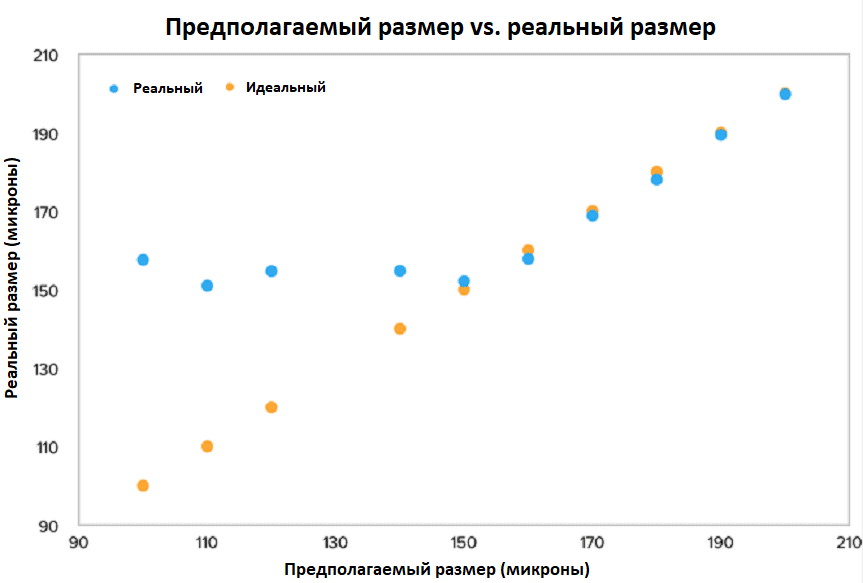
The results show that the Form 2 has the same ideal and actual XY resolution for model features starting at 150 μm.
As the line width decreases from 200 to 150 μm, the measured values closely match the ideal ones and fall within the 95% confidence interval. As the intended line width drops below 150 μm, the measured interval begins to significantly deviate from the ideal. This means the printer can reliably reproduce features on the XY plane up to 150 μm in size, which is roughly the thickness of a human hair.
The minimum XY feature size for the Form 2 printer is about 150 μm — just 10 μm larger than the spot size of its built-in laser (140 μm). The minimum feature size cannot be smaller than the laser spot size. Many factors affect this value: laser refraction, microscopic contaminants, the chemical properties of the resin, etc. Considering the entire printer ecosystem, a 10 μm difference is nominal. Not all 3D printers have a stated resolution that matches the actual one, so before choosing the right resolution for your project, it is highly recommended to do your research.
If you need models with fine details, look for a printer where the XY resolution is not just stated as a number, but is backed by measurement data.
Resolution in 3D Printing. Z Resolution
When looking at 3D printer specifications, you will notice that the Z-axis resolution parameter is the most common. Layer thickness, or vertical resolution, was the first primary numerical parameter that differentiated early 3D printers. The first machines were characterized by a layer thickness of 1 mm. Now, this parameter in FDM 3D printers can be less than 0.1 mm, and in LFS and SLA printers — even smaller.
Formlabs 3D printers support layer thicknesses from 25 to 300 μm, depending on the material. This range of values allows you to choose a material with the perfect balance between speed and print quality. But the main question is what layer thickness will be ideal for your model.
Are Thinner Layers Always Better?
High 3D printing resolution affects other parameters. The thinner the layer, the more layers need to be printed, which increases the model's print time. After all, as a rule, printing at a 25 μm resolution takes four times longer than at a 100 μm resolution. It should be remembered that the more layers there are, the higher the probability of errors. For example, even with a 99.99% successful layer print rate, quadrupling the resolution reduces the chances of a successful model print from 90% to 67%, assuming that a layer with an error results in a failed print.
The smaller the layer thickness, the longer the print takes and the higher the probability of errors and distortions.
Is it true that the higher the resolution (the thinner the layers), the higher the quality of the finished models? Not always. It depends on the model and the XY resolution of the 3D printer. As a rule, the smaller the layer thickness, the longer the print takes and the higher the probability of distortions and errors. In some cases, printing models at a lower resolution (i.e., with thicker layers) can even result in higher quality.
When Thinner Layers Are Not Needed
Thinner layers are usually associated with smoother diagonal transitions. For this reason, many users push the Z resolution to its limit. But what if the model consists mostly of vertical and horizontal faces, with right angles and few diagonal surfaces? In such cases, increasing the number of layers will not lead to an improvement in print quality.
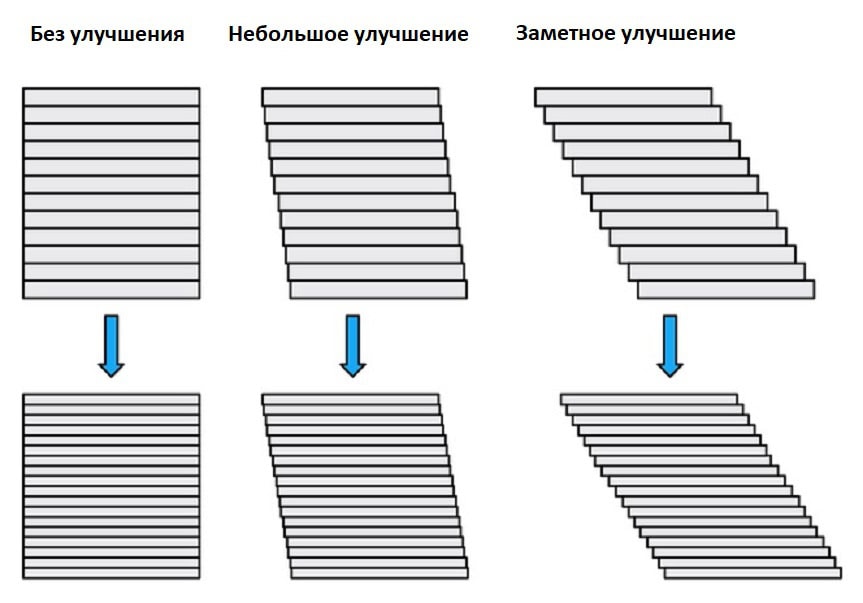
The problem is exacerbated if the printer's XY resolution is not ideal and it "overshoots" when forming external faces. The more layers, the more mismatched ridges there will be on the surface. In this case, the finished model will look much worse, even if the Z resolution is higher.
When to Increase Z Resolution
There are times when resolution needs to be increased. If you have a printer with good XY resolution and a model with complex features and many diagonal faces, decreasing the layer thickness will result in a physical model of significantly better quality. Moreover, if this model is small (no more than 200 layers), then increasing the Z-axis resolution will lead to a real improvement in quality.
Certain design choices benefit from higher Z resolution. These include, for example, organic shapes, rounded arches, fine embossing, and intricate engraving.
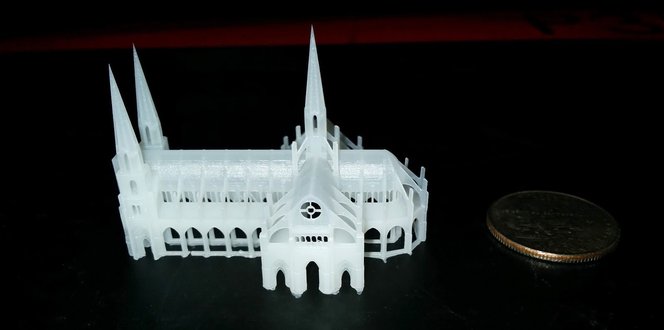
A tiny model with a lot of details and arched elements requires a higher Z resolution. This cathedral was printed on a Form 2 printer at a 25 μm resolution.
Print thicker layers and increase Z resolution only when it is truly necessary. With the right combination of printer and model type, a higher Z resolution will capture the intricate details of your design.
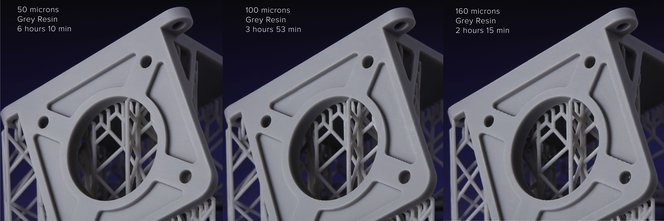
Grey Resin allows printing at a resolution of 160 μm. Judge the difference in speed for yourself.
Formlabs' PreForm software allows you to choose the layer thickness. Starting with version PreForm 3.0.3, Grey Resin can be used to print models with layer heights of 160, 100, 50, and 25 μm. Printing at a 160 μm resolution speeds up the iteration process. This allows engineers to go from design to a finished model even faster. And dentists can produce more aligners per day without compromising quality.
Get Started with a High-Resolution 3D Printer
You have been introduced to the concept of resolution and understand the differences in 3D printing technologies and outcomes. Hopefully, it will now be much easier for you to choose a 3D printer that optimally fits your needs and workflow.
To learn more about next-generation stereolithography 3D printers, check out the information on the Form 4 and Form 4L devices.
Want to see with your own eyes what models printed with high resolution look like? Request a sample print delivered straight to your office.
Read also other materials to help you choose a 3D printer:
How to Choose a Desktop 3D Printing Technology: FDM, SLA, and SLS. Speed
How to Choose a Desktop 3D Printing Technology: FDM, SLA, and SLS. Price





Leave a Comment